

Endpoints is the API reference for an agent’s unique call URL. Send a POST with JSON to start a call from your website, form, or CRM.
| Mode | What happens |
|---|---|
| Outbound | AI Sync places the call. The person’s phone rings. |
| Inbound | AI Sync does not ring the phone. It returns a SIP address (dialSip) so your phone system can connect the caller to the agent. |
Open from AI → AI Agents → agent Actions → Endpoints.
✨ What you can do#
- Copy the agent’s unique POST URL
- Send outbound or inbound calls with the same URL
- Pass contact fields (name, email, and more) with the call
- Copy request examples in PHP, JavaScript, cURL, or Python
📑 What you see on the page#
The page has two tabs: Outbound and Inbound. Switching tabs updates the hint, sample body, and response. The URL stays the same.
| Area | What it shows |
|---|---|
| POST URL | Agent’s unique webhook URL — use Copy URL |
| Body · application/json | Fields you can send (required marked) |
| Request example | Ready-made snippets by language |
| Response | Sample replies for 201, 400, 403, 404, 422 |
This URL belongs only to this agent. Do not share it publicly. Always copy it from this page.
📋 Fields you can send#
Same body shape on both tabs. Extra contact fields are passed through so the agent can use them on the call.
| Field | Required | Notes |
|---|---|---|
phone_number | Yes | E.164 format, starting with + (for example +12137771235) |
call_mode | For inbound, yes | outbound (default if omitted) or inbound |
override_agent_id | No | Use a different agent for this call only |
ghl_contact_id | No | Attach a CRM contact to the call |
local_presence_number | No | Yes or No — if Yes, place the outbound call from a local presence number |
| Other contact fields | No | Listed under Optional contact fields on the page |
📤 Outbound#
Use Outbound when you want the agent to dial someone.
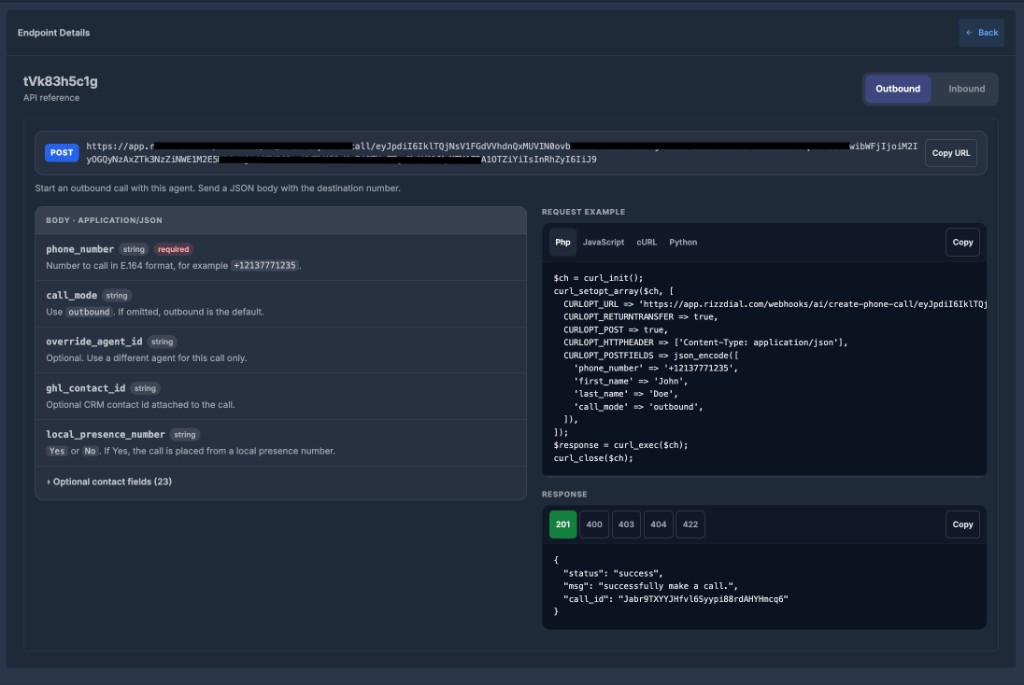
- Open Endpoints and stay on the Outbound tab.
- Copy the URL, or copy a request example in your language.
- Send a POST with JSON.
Example body
{
  "phone_number": "+12137771235",
  "first_name": "John",
  "last_name": "Doe",
  "call_mode": "outbound"
}
You can leave call_mode out. If it is missing, outbound is used.
Success (201)
{
  "status": "success",
  "msg": "successfully make a call.",
  "call_id": "..."
}
The person’s phone should ring. There is no dialSip on outbound.
📥 Inbound#
Use Inbound when the person already called you (or will be connected by your phone system).
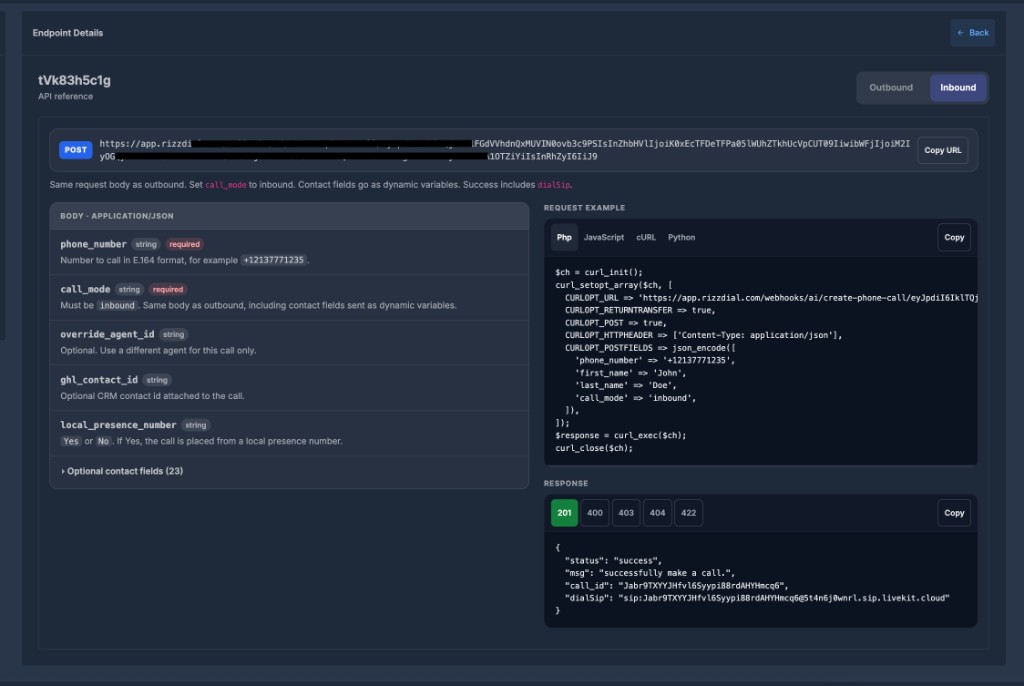
- Open Endpoints and switch to the Inbound tab.
- Copy the URL or the inbound example. The URL is the same — only the body changes.
Example body
{
  "phone_number": "+12137771235",
  "first_name": "John",
  "last_name": "Doe",
  "call_mode": "inbound"
}
call_mode must be inbound.
Success (201)
{
  "status": "success",
  "msg": "successfully make a call.",
  "call_id": "...",
  "dialSip": "sip:...@..."
}
This request does not ring a phone. That is expected.
call_id— id of the registered calldialSip— address your phone system uses to connect the live caller to the agent
💻 Request examples#
Language tabs on the page:
| Tab | What it is |
|---|---|
| Php | PHP snippet |
| JavaScript | Browser / Node fetch snippet |
| cURL | Command-line snippet |
| Python | Python snippet |
Copy copies the selected language. Replace the sample number and names before you run it. All examples send JSON with Content-Type: application/json.
📨 Response codes#
| Code | Meaning |
|---|---|
| 201 | Success. Outbound returns call_id. Inbound also returns dialSip. |
| 400 | The request format is invalid. |
| 403 | The agent is inactive, or the account cannot place the call (for example insufficient balance). |
| 404 | The agent was not found, or no phone number is assigned. |
| 422 | The call could not be created. |
✅ Before you send a request#
- The agent must be Active
- A phone number must be assigned to the agent
- Your account must have call balance
- Use a real
phone_numberin+(E.164) format
If something fails, the response includes status: error and a short message. Match it to the 403 / 404 / 422 samples on the page.