

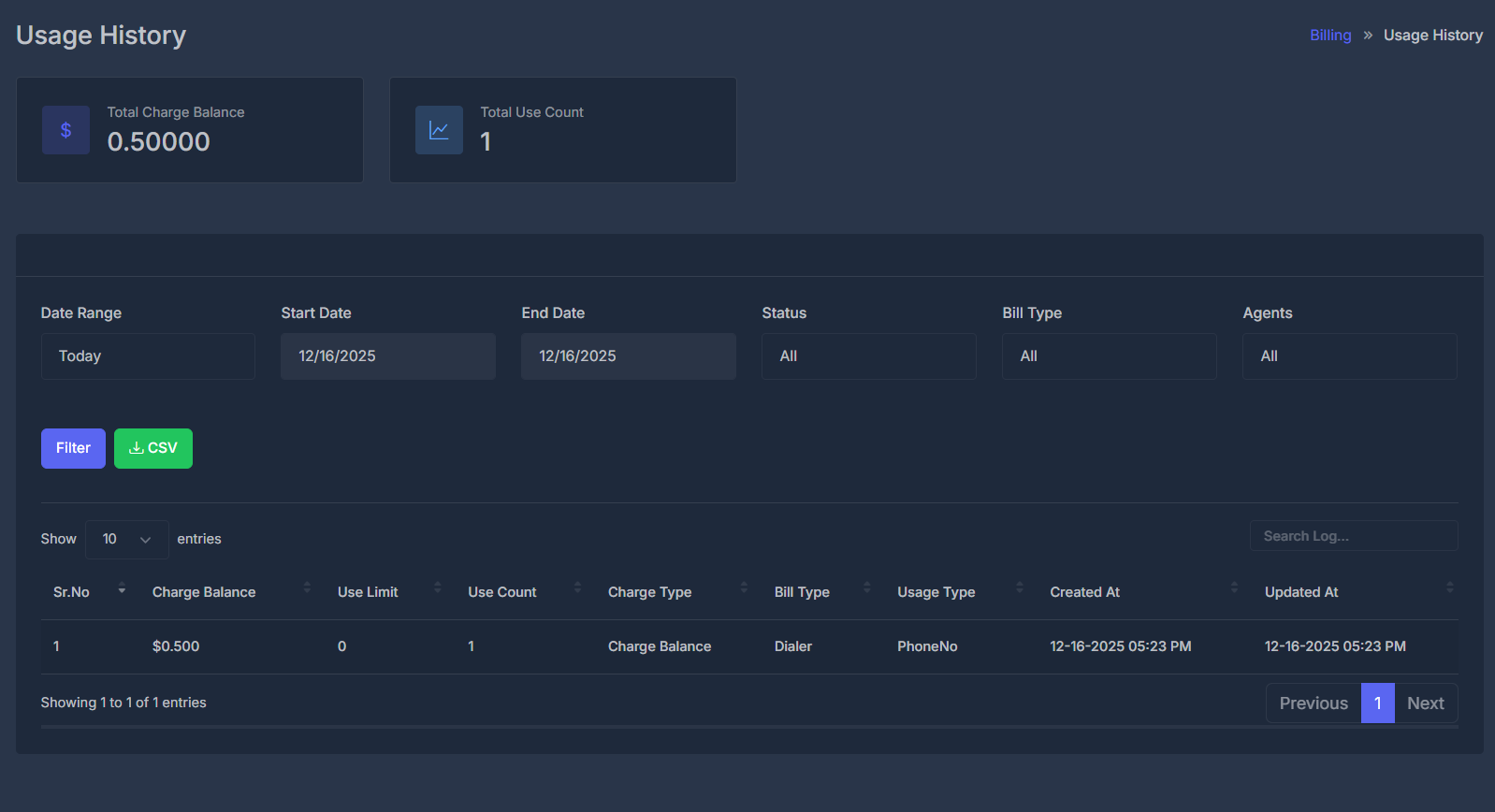
📊 Overview#
The Usage History feature provides a comprehensive dashboard for monitoring your platform consumption, tracking charges, and analyzing usage patterns. This powerful tool helps you understand your spending, optimize usage, and make informed decisions about your service plans.
Real-time Tracking: All usage is tracked and updated in real-time, giving you instant visibility into your consumption patterns and costs.
📥 Usage History - CSV Export#
Want to keep a copy of your usage data or analyze spending in Excel/Google Sheets? You can quickly export your usage records as a CSV file.
How to Download Your Usage History
-
Choose Filters
- Date Range:
Pick a time period (e.g., Today, Last 7 Days, This Month, or set a custom range). - Status:
Narrow down data by type—Phone No, Minute, SMS, or Other. - Bill Type:
Limit to only Dialer or AI usage entries. - Agent:
Filter for a specific agent’s activity.
- Date Range:
-
Apply Filters
Click the Filter button after making your selections to refresh the results. -
Export
Click the green CSV button next to Filter. Your file will automatically download!
Open the exported file in Excel, Google Sheets, or any spreadsheet software for custom reporting.
🧾 About CSV (Comma Separated Values)
- CSV is a simple, universal file format for tabular data.
- Each line is a row, and each value is separated by a comma.
- CSV files work seamlessly with Excel, Google Sheets, Numbers, and most data tools.
What’s in your CSV export?
- All visible usage records (based on your filters)
- Details such as:
- Charge amount
- Usage counts
- Charge type
- Bill type
- Agent
- Date and time of all entries
Need your records for tax, audits, or budgeting? CSV export helps you stay organized and in control!
📊 Track Usage
Monitor real-time usage across all services and features
💰 Cost Analysis
Analyze charges and optimize your spending patterns
📈 Usage Analytics
Gain insights into consumption trends and patterns
Current Balance: $4.43166 | Total Usage Count: 17 entries
🚀 Key Features#
💳 Charge Balance Tracking
Monitor your account balance and track all charge deductions in real-time
📅 Flexible Date Filtering
Filter usage data by custom date ranges, predefined periods, or specific timeframes
🎯 Service-Specific Analytics
Track usage separately for AI services, Dialer, and other platform features
🔍 Advanced Search & Filter
Search usage records by charge type, bill type, agent, and usage patterns
📱 Responsive Dashboard
Access your usage history from any device with full functionality
⚡ Usage Tracking Workflow#
Workflow Steps#
- 🚀 Service Usage: User consumes AI services, makes calls, or uses platform features
- ⏱️ Usage Metering: System tracks usage duration, count, or consumption amount
- 💰 Charge Calculation: Platform calculates charges based on usage rates and pricing
- 📝 Record Creation: Usage record is created with detailed consumption data
- 💳 Balance Deduction: Charges are deducted from account balance
- 📊 History Update: Usage data appears in the usage history dashboard
- 🔔 Usage Alerts: Notifications sent for significant usage or low balance
- 📈 Analytics Update: Usage patterns and trends are updated for insights
📋 Usage History Fields#
Each field in the usage history provides specific insights into your platform consumption and charges.
🏷️ Service Classification Fields#
Charge Type
Values: Charge Balance
Purpose: Categorizes the type of charge applied
Identifies how the usage was charged
Bill Type
Values: AI, Dialer, SMS, Voice
Example: AI, Dialer
Service category that generated the charge
Usage Type
Values: Minute, Call, Message, Token
Example: Minute
Unit of measurement for the usage
Agents
Format: Agent Name/ID
Purpose: Identifies which agent generated the usage
Links usage to specific AI agents or users
⏰ Timestamp Fields#
Created At
Format: MM-DD-YYYY HH:MM AM/PM
Example: 08-30-2025 02:38 AM
When the usage occurred
Updated At
Format: MM-DD-YYYY HH:MM AM/PM
Example: 08-30-2025 02:38 AM
When the record was last modified
📊 Complete Field Reference#
| Field | Description | Example Value | Data Type | Purpose |
|---|---|---|---|---|
| Sr.No | Sequential record number | 1 | Integer | Unique identifier |
| Charge Balance | Amount deducted | $0.300 | Currency | Cost tracking |
| Use Limit | Service usage limit | 0 (Unlimited) | Integer | Limit management |
| Use Count | Times service used | 1 | Integer | Usage frequency |
| Charge Type | Type of charge | Charge Balance | String | Charge categorization |
| Bill Type | Service category | AI, Dialer | Enum | Service identification |
| Usage Type | Unit of measurement | Minute | String | Usage unit |
| Created At | Usage timestamp | 08-30-2025 02:38 AM | DateTime | Time tracking |
| Updated At | Last modified time | 08-30-2025 02:38 AM | DateTime | Change tracking |
🎛️ Dashboard Features & Controls#
📊 Usage Summary Cards#
💰 Total Charge Balance
Current Value: $4.43166
Shows your current account balance after all usage deductions
📊 Total Use Count
Current Value: 17
Total number of usage events recorded in the selected period
🎛️ Filter Controls#
📅 Date Range Filter
Options:
- Last 7 Days (Default)
- Last 30 Days
- Custom Date Range
- This Month
- Last Month
Usage: Filter usage records by specific time periods
📊 Status Filter
Options:
- All (Default)
- Active
- Completed
- Failed
Usage: Filter by usage record status
👥 Agents Filter
Options:
- All (Default)
- Specific Agent
- Agent Groups
Usage: Filter usage by AI agent or user
💡 Usage Optimization Tips#
Pro Tip: Monitor your usage patterns regularly to identify opportunities for cost savings and efficiency improvements.
🎛️ Advanced Controls#
📈 Data Visualization
Chart Types:
- Line charts for trends
- Bar charts for comparisons
- Pie charts for distributions
- Heatmaps for patterns
- Custom dashboard widgets
Interactive Features:
- Zoom and pan functionality
- Hover tooltips
- Click-through details
- Real-time updates
🔔 Alert Configuration
Alert Types:
- Usage threshold alerts
- Cost limit notifications
- Unusual pattern detection
- Service availability alerts
Delivery Methods:
- Email notifications
- SMS alerts
- In-app notifications
- Webhook integrations
⚙️ Automation Settings
Automated Actions:
- Auto-pause services at limits
- Scheduled usage reports
- Automatic balance top-ups
- Smart usage optimization
Configuration:
- Rule-based automation
- Custom trigger conditions
- Action workflows
- Approval processes
🛡️ Troubleshooting & Best Practices#
🔧 Common Issues & Solutions#
❌ Missing Usage Records
Possible Causes:
- Delayed processing (up to 5 minutes)
- Network connectivity issues
- Service maintenance periods
Solutions:
- Wait 5-10 minutes and refresh the page
- Check system status page
- Verify date range filters
- Contact support if records are missing after 1 hour
💰 Incorrect Charge Amounts
Possible Causes:
- Rate changes during usage period
- Promotional pricing applied
- Bulk usage discounts
Solutions:
- Check current pricing in settings
- Review promotional offers
- Verify usage duration calculations
- Submit billing inquiry if discrepancies persist
📊 Slow Dashboard Loading
Possible Causes:
- Large date range selected
- High volume of usage records
- Browser cache issues
Solutions:
- Reduce date range to last 30 days
- Clear browser cache and cookies
- Use pagination instead of loading all records
- Try a different browser
🔍 Search Not Working
Possible Causes:
- Special characters in search query
- Case sensitivity issues
- Index update delays
Solutions:
- Use simple search terms
- Try case-insensitive search
- Wait a few minutes for index updates
- Use advanced filters instead
Last Updated: This documentation reflects the latest features as of the current platform version. For the most up-to-date information, please refer to the in-app help system.